Curvine Benchmark: 300 Million Files in Just 38 GB of Memory

ยท 5 min read

Translated from the original Chinese article published on April 6, 2026.

In distributed file systems, metadata memory efficiency, concurrent request handling, and small-file throughput are core indicators of overall system capability. Curvine recently completed a high-intensity metadata benchmark, and the results were clear: Curvine reached a new high-water mark for open-source metadata efficiency while delivering core capabilities comparable to commercial distributed storage products.

๐Ÿ”ฅ Key Takeawaysโ€‹

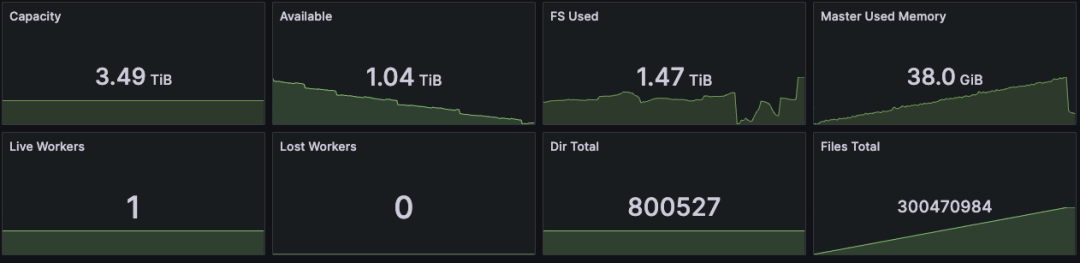
  • Efficient memory usage: With 800,000 directories and 300 million files, and one block written per file, Curvine used just 38 GB of memory. That is roughly on par with the metadata-memory capability described for the commercial edition of JuiceFS in reference [1].
  • Low latency under massive concurrency: With 100,000 clients looping operations, throughput held steady at 53,000 ops/s. Average command latency stayed below 2 ms, and P99 latency stayed below 9 ms.
  • High small-file throughput: Under heavy concurrent small-file writes, Curvine sustained 12 million small files per hour, with an average write time of 0.3 ms per file.

๐Ÿ“ Test Setupโ€‹

  • Curvine cluster: one Master and one Worker
  • Benchmark machine: Alibaba Cloud ecs.i5.8xlarge, 32 cores, 256 GB RAM
  • Clients: 100,000 FUSE clients
  • Operations: repeated high-frequency commands such as mkdir, touch, file writes, and ls

๐Ÿ“Š Core Benchmark Resultsโ€‹

๐Ÿง  Memory Efficiency: A New Open-Source High-Water Markโ€‹

  • Managed scale: 800,000 directories + 300 million files
  • Per-file data written: 1 block
  • Total memory usage: 38 GB
  • Comparison point: comparable to the metadata-memory capability described for the commercial edition of JuiceFS

Memory efficiency benchmark

โฑ๏ธ High Concurrency, Low Latency at 100,000 Clientsโ€‹

  • Concurrent clients: 100,000 FUSE clients
  • Stable throughput: 53,000 ops/s
  • Average latency: up to 2 ms
  • P99 latency: up to 9 ms

QPS under concurrency

Latency under concurrency

Connection overhead was also low: 100,000 live connections consumed only 1.1 GB, or about 11.5 KB per connection.

Connection overhead

Once the benchmark stopped, Master memory dropped immediately from 39.1 GB back to 38 GB.

Master memory after benchmark stop

๐Ÿš€ Small-File Throughput: Built for Scaleโ€‹

  • Files written per hour: 12 million small files
  • Average write time per file: 0.3 ms
  • Throughput remained saturated even under high concurrency

At 15:00, Curvine had written 287 million files:

Small-file count at 15:00

At 16:00, the total had reached 299 million files:

Small-file count at 16:00

๐Ÿ—๏ธ Metadata Architectureโ€‹

Curvine's metadata subsystem stands out not just in large-scale memory efficiency and high-concurrency performance, but also in comparison with other open-source systems. Those results come from a deliberately designed metadata architecture.

Curvine metadata architecture overview

๐Ÿ’ก Design Principlesโ€‹

  1. A single Master should support very large namespaces and massive numbers of small files.
  2. The system should provide high concurrency and low latency for frequent operations such as create, delete, and update.
  3. External dependencies should be minimized to reduce operational complexity while keeping the system stable.

Based on those goals, Curvine combines an in-memory directory tree, standalone RocksDB, and a Raft-based consistency mechanism. This three-layer design balances performance, scale, and stability.

LayerCore ResponsibilityWhy It Exists
In-memory directory treeStores directory structure metadata such as directory names and parent-child relationships; handles path resolution, directory listing, and other high-frequency namespace operationsKeeps the hottest namespace operations in memory so directory lookups and path matching stay in the microsecond range; stores only lightweight directory structure to maximize scale
Metadata RocksDB (inode engine)Persists complete file and directory metadata, including file size, permissions, mtime, block locations, and full directory relationshipsUses column families to separate different metadata types, improving read/write efficiency and making frequent metadata updates easier to manage
Raft log RocksDBPersists the log of all metadata mutations, including create, delete, and update operations, in order for node-to-node synchronizationSeparates log storage from metadata storage so replication, compaction, cleanup, and recovery do not interfere with metadata reads and writes

๐Ÿ›ก๏ธ FsMode: Working with UFS for Safe Durabilityโ€‹

Curvine also supports FsMode, which synchronizes metadata and file data to the underlying file system (UFS). This creates a dual safety model of local storage plus disk-backed fallback, preventing data loss without sacrificing runtime performance.

๐Ÿš€ Future Directionsโ€‹

Curvine's metadata system will keep pushing forward in three areas:

  1. 10 billion files on a single node: continue deepening single-node capability until a standard 512 GB memory machine can manage metadata for 10 billion files.
  2. Federation: improve cluster-scale metadata expansion with an HDFS Federation-like model that partitions by directory and can scale beyond 100 billion files. Federation is especially strong for centralized metadata operations such as mv and ls, but it requires directory planning up front.
  3. Pluggable metadata management: abstract the metadata interface and support pluggable metadata backends for better flexibility and adaptability.

๐Ÿ“š Referencesโ€‹

  1. https://mp.weixin.qq.com/s/zbBUQ4P53PPWQjOHQmw8uw
  2. https://hadoop.apache.org/docs/r3.4.0/hadoop-project-dist/hadoop-hdfs-rbf/HDFS%20RouterFederation.html

๐Ÿ‘‡ Follow Usโ€‹

We regularly share hands-on work on distributed storage, metadata optimization, and high-concurrency benchmarking.

GitHub: https://github.com/CurvineIO/curvine

Curvine: Next-Generation Unified Data Access Layer, Combining POSIX and High-Speed Cache

ยท 7 min read

In our practice with distributed cache, we have identified core pain points users face: insufficient POSIX semantics support, high resource consumption, and complex operations. To better address these challenges, we have restructured Curvine's architecture and development roadmap, creating a next-generation unified data access layer that combines strong POSIX semantics with high-performance caching, delivering a qualitative improvement in remote data access experience.

Two Core Mount Modes for Diverse Business Needsโ€‹

Curvine optimizes data read/write patterns into two concise mount point modes: CacheMode and FsMode, each targeting different business scenarios. This design balances cache acceleration with complete semantics support, allowing users to choose flexibly based on actual requirements.

CacheMode: Lightweight Read Cache Acceleration, Tightly Coupled with UFSโ€‹

CacheMode centers on UFS (Underlying File System), primarily serving as a read cache accelerator and unified proxy for UFS. All read/write operations are UFS-centric:

  • Metadata caching effectively accelerates common operations like ls
  • Write operations go directly to UFS
  • Users maintain strong awareness of UFS without changing existing data operation habits

This is the preferred solution for lightweight UFS read performance improvement.

FsMode: Full Performance Acceleration with Strong POSIX Semanticsโ€‹

FsMode places Curvine itself at the core, with metadata independently managed by Curvine. Its path structure maps one-to-one with UFS, while UFS serves only as Curvine's cold storage layer. This mode provides:

  • Comprehensive read/write cache acceleration
  • Better POSIX semantics support for read/write operations
  • Ideal for large-scale file performance acceleration
  • Best choice for scenarios requiring both semantic completeness and high performance

FsMode Deep Dive: Layered Design Balancing Performance and Consistencyโ€‹

As Curvine's core mode, FsMode employs a layered filesystem mount/write design. Through clear semantic definitions and process planning, it achieves balance among performance, semantics, and data consistency. Let's examine its core design details.

Core Semantic Rulesโ€‹

  1. Unified IO Entry Point: All data read/write operations go through Curvine. Applications should use only Curvine paths; direct UFS access is not recommended as it cannot guarantee data consistency.

  2. Asynchronous Cold Storage Writes: When writing data, it first lands in Curvine (metadata + blocks). The Master side periodically submits Load/Dump tasks based on policies to asynchronously flush data to UFS (e.g., S3), making frontend write operations more efficient.

  3. Intelligent Read Backfill: When reading data, Curvine is prioritized. If data has been evicted or exists only in UFS, a Load operation backfills UFS data to Curvine. The current read passes through directly from UFS, balancing read speed with data availability.

  4. Flexible Replica Forms: Allows states where only UFS contains data. In such cases, UFS data serves as the file's sole replica, maximizing storage resource utilization.

  5. On-Demand Metadata Synchronization: The mount operation synchronizes all metadata under the directory. Full synchronization is not performed actively afterward. If needed, use the mount resync command to manually update mount point metadata (synchronizing only file metadata that exists solely in UFS).

  6. Lazy Cache Loading: If a file being read has no metadata in Curvine but exists in UFS, the first read will fail. On retry, UFS files are actively fetched. Alternatively, manually trigger the mount resync command in advance to synchronize metadata and avoid read failures.

  7. Fault Tolerance Design: When Master fails, users can access data normally through UFS interfaces. When Worker fails, other replicas can be accessed in multi-replica scenarios; in single-replica scenarios, direct UFS reading ensures business continuity.

Consistency Design: Usable Now, Better in Futureโ€‹

The current FsMode consistency implementation:

  • When a UFS path is first mounted to Curvine, all metadata under that directory is mapped to Curvine as a whole
  • If files are written directly to UFS bypassing Curvine, Curvine cannot automatically perceive these changes
  • Manual re-synchronization via sync commands is required in such cases

Future Planning: Curvine will implement automatic perception of UFS metadata change events, enabling near real-time UFS metadata synchronization. This will technically guarantee data consistency completely, allowing users to operate without concerning themselves with synchronizationโ€”truly seamless usage.

FsMode Core Design Objectivesโ€‹

All FsMode designs revolve around clear objectives, ensuring every capability precisely addresses business pain points:

  • Unified Entry Point: All operations go through Curvine paths. Applications don't need to adapt to UFS, reducing development and operations costs.
  • POSIX Semantics: Supports complete POSIX filesystem semantics, including directory trees, random read/write, renaming, atomicity, strong consistency, etc., adapting to various traditional and new applications.
  • Tiered Storage: Curvine layer stores hot data (metadata + optional local blocks), UFS serves as persistent/cold replica, achieving hot/cold data separation for improved storage efficiency and access performance.
  • Background Flushing: Master periodically submits Load/Dump tasks based on business operations and preset policies to asynchronously flush Curvine data to UFS without affecting frontend business.
  • UFS-Only Replica: Supports scenarios where data exists only in UFS (e.g., S3). Data is backfilled on-demand or read-through as needed, balancing storage flexibility with data accessibility.

CacheMode vs FsMode: Core Differences at a Glanceโ€‹

To help you clearly distinguish between the two modes and precisely match business scenarios, we've organized the core comparison dimensions:

Comparison ItemCacheModeFsMode
Semantics SupportOnly supports UFS's native semanticsSupports complete POSIX semantics (directory trees, random read/write, renaming, atomicity, strong consistency, etc.)
Write MethodData writes directly to UFS; applications tightly coupled with UFSData writes to Curvine; JM asynchronously flushes to UFS; applications face only Curvine
Metadata ManagementMetadata cached but maintains strong consistency with UFSMetadata maintained by Curvine Master, periodically synchronized to UFS; Curvine prevails in conflicts; UFS modifications via other interfaces are not actively perceived by Curvine
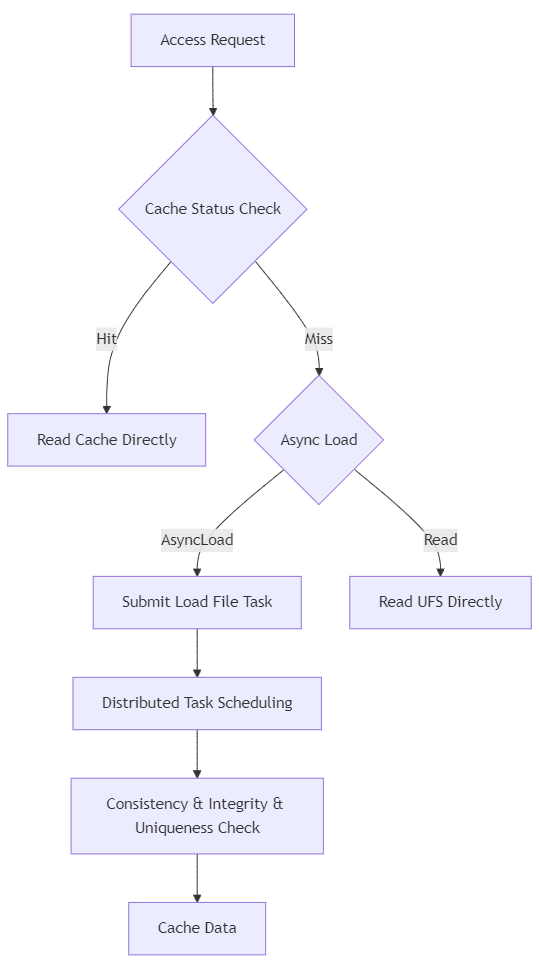
Read LogicIf cache exists, read from Curvine; if no cache, submit async task to load to Curvine, current read directly from UFSPrioritize reading from Curvine; if no data in Curvine, Master marks as hot data and backfills to Curvine; current read directly from UFS
Data Expiration HandlingDeletes both metadata and data blocks in CurvineDeletes only Curvine data blocks, retains metadata
Consistency GuaranteeConstrained by UFS (e.g., S3 eventual consistency)Strong consistency on Curvine side; eventual consistency with UFS via async tasks

Extreme Resource Optimization, Lighter and More Friendlyโ€‹

Beyond refining functionality and performance, Curvine has made deep optimizations in resource consumption, upgrading comprehensively from underlying technology stack to implementation methods:

Curvine is built on Rust, naturally possessing high performance and low resource consumption characteristics. It also employs cutting-edge optimization techniques such as asynchronous operations and zero-copy, further reducing resource footprint.

Online practice data shows: A single Curvine Worker process occupies less than 1GB of memory. In large-scale cluster deployments, this effectively reduces server resource investment and operational costs, making it easily adaptable even in resource-constrained scenarios.

Product Philosophy: Not a Replacement, Just a Better Data Access Methodโ€‹

Curvine has had a clear product positioning from the start:

Not pursuing to become a general-purpose POSIX filesystem, nor attempting to replace any storage product.

We have always focused on one thing: making remote data access so fast that you can't feel the "remote" aspect, without changing users' original data operation habits. This is not only a technical challenge but also Curvine's core product philosophyโ€”the best infrastructure is the kind that makes you unaware of its existence.

In the AI era, data volume is exploding. Remote data access performance and experience have become key factors affecting business efficiency. Curvine integrates the wisdom of distributed cache technology with POSIX completeness of distributed filesystems, while adhering to the core principle of "metadata transparency, unchanged file structure." Users can achieve a leap in remote data access performance without major modifications to existing business systems.

In the future, Curvine will continue toๆทฑ่€• the unified data access layer field, continuously optimizing performance, stability, improving semantics support, and simplifying operations processes. We are committed to becoming a key part of data infrastructure in the AI era, providing efficient, stable, and lightweight data access support for digital upgrades of various businesses.

Finally, we hope more open-source enthusiasts from the storage and Rust fields will join us in building and sharing together!


Powered by OPPO Bigdata.

The Pain of Distributed Cache: Ideal vs. Reality

ยท 6 min read

After six months of open-source journey and surveying multiple users, we have gained a clear understanding of the pros and cons of the distributed cache model. In light of the limitations of distributed cache application scenarios, here is a simple reflection.

In today's booming era of big data and artificial intelligence, "storage-compute separation" has become the mainstream paradigm of cloud-native data architecture. Computing resources can elastically scale, while data is uniformly settled in low-cost object storage (such as S3, OSS). However, this architecture brings a fatal pain point: the high latency and low throughput of object storage seriously drag down computing performance. Thus, the distributed cache layer emerged as neededโ€”it was hoped to become a high-speed bridge connecting "flexible computing" and "cheap storage."

Distributed file cache systems can "transparently accelerate" access to remote storage and provide a unified namespace. However, when enterprises eagerly introduce them into production environments, they often fall into the predicament of underwhelming performance, operational complexity, and semantic mismatch. This article will deeply analyze the gap between the technical ideal of distributed cache and its landing reality, revealing the structural limitations of distributed cache in general scenarios.

I. The Ideal of Distributed Cache: Unified, Transparent, High-Performanceโ€‹

The original design intention was highly attractive:

  • Unified Namespace: Mount heterogeneous storage such as HDFS, S3, GCS into a single directory tree, applications only need to access xx://;
  • Transparent Cache: After the first read of remote data, automatically cache to memory/SSD, subsequent responses in milliseconds;
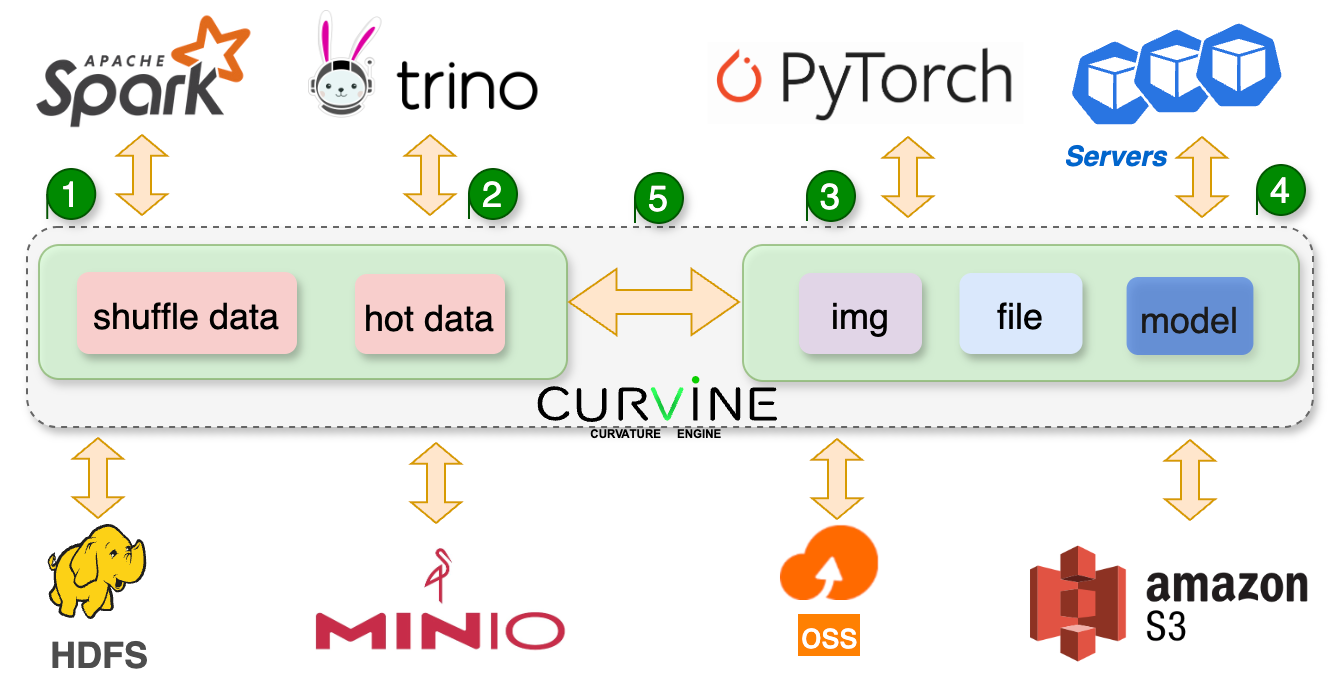
  • Ecosystem Compatibility: Seamlessly integrate with mainstream computing engines such as Spark, Presto, Pytorch, without code modifications;
  • Tiered Storage: Support memory โ†’ SSD โ†’ HDD multi-level caching, balancing performance and cost.

In demonstration environments, distributed cache can indeed significantly improve the access performance of object storage, especially in scenarios where model training repeatedly reads input.

II. Reality's Pain: Three Structural Defectsโ€‹

However, the ideal is full, but the reality is bony. Distributed cache exposes three unavoidable defects in real business scenarios.

Pain 1: Incomplete POSIX Semantics, Limited Versatilityโ€‹

Distributed cache provides POSIX-like interfaces through FUSE, enabling traditional applications to read remote data like accessing local files. However, its support for POSIX semantics is highly incomplete:

  • โŒ No random write support: Cannot modify bytes in the middle of a file, only allows creating new files or full overwrites;
  • โŒ No truncate, hard links, or file locks;
  • โš ๏ธ Strong consistency missing: Multiple clients may read expired cache, requiring manual metadata refresh.

This means distributed cache simply cannot run databases, log systems, or any programs requiring in-place updates. It is essentially designed for WORM (Write-Once-Read-Many), not a general-purpose file system. Many teams, after attempting to "seamlessly migrate" existing business to distributed cache, discover their applications crash due to write operation failures.

Truth: Distributed cache is not a "distributed POSIX file system," but a "data orchestration layer optimized for batch processing."

Pain 2: High Resource Consumptionโ€‹

Currently, distributed cache systems using Java or Go languages generally have high resource consumption problems.

For example, Java processes often occupy tens of GB of memory, which is somewhat wasteful for systems that use memory as cache.

Pain 3: Operational Complexity, ROI Hard to Deliverโ€‹

The deployment of distributed cache involves multiple components such as Master, Worker, Journal, UFS connectors, etc., and resource tuning (memory allocation, cache policies, network configuration) is extremely complex. More fatally:

  • Cache hit rate depends on data access patterns: If jobs are one-time scans (such as ETL), caching has no value;
  • Resource competition: Memory/SSD occupied by Workers competes with Spark Executors for node resources;
  • Troubleshooting difficulties: Issues like cache inconsistency, block loss, and UFS synchronization failures require deep source code analysis to locate.

Many teams invest months in building and tuning cache clusters, only to find limited performance improvement but doubled operational burden, forcing them to abandon it.

III. Reflection: Can Distributed Cache Replace File Systems?โ€‹

The dilemma of distributed cache reflects a deeper issue: attempting to use a general-purpose intermediate layer to solve all I/O problems is itself a form of technical dogmatism.

Distributed cache has significant effects in large-scale data I/O scenarios such as big data and AI training. However, as a company, purchasing or deploying a distributed cache cluster cannot achieve universal application across scenarios, nor can it fully utilize its capabilities.

Trend: "Specialized is better than generalized" โ€” Rather than maintaining a heavyweight distributed cluster, it is better to build a more versatile tiered file system with a cache acceleration layer in the middle, providing more general support with file system semantics.

IV. Way Out: Rational Choice, Scenario-Drivenโ€‹

Distributed cache is not without merit. It still has value in the following scenarios:

  • โœ… Hybrid cloud/multi-cloud architecture: Unified access to object storage from different cloud providers;
  • โœ… High-reuse read-only datasets: Such as benchmark datasets repeatedly used in AI training;
  • โœ… Dedicated platform teams available: Can bear its operational and tuning costs.

However, for most enterprises, a more pragmatic path is:

  1. First evaluate whether I/O is truly a bottleneck: Confirm through profiling;
  2. Prioritize optimizing data formats and query logic: Use Iceberg/Lance instead of raw files;
  3. Avoid "using cache for the sake of using cache": Caching is a means, not an end;
  4. Build general-purpose file system capabilities: Build cache that rivals file system capabilities, fully exploring versatility.

Conclusionโ€‹

Distributed cache is a phased technical experiment that has promoted the development of data orchestration concepts. However, its "pain" also warns us: there is no silver bullet, only trade-offs. On the road to pursuing high performance, blindly introducing general-purpose middleware often backfires. True engineering wisdom lies in understanding the essence of business and choosing the most matching tool, even if it's not "cool" enough.

Distributed cache should not be a standard configuration of architecture, but rather a precise scalpel for specific scenarios. Only by building more general, lightweight, and efficient tiered file systems can we avoid falling into the "cache pain" and let data truly flow, rather than being trapped in layers of abstraction.


Powered by OPPO Bigdata.

Observability Construction for Curvine

ยท 7 min read

Curvine as a high-performance distributed cache system has strict requirements for performance, stability, and reliability. To ensure the system maintains optimal performance under various load conditions and to quickly locate and resolve potential issues, we have built a comprehensive monitoring solution based on Prometheus and Grafana. This monitoring system provides deep observability capabilities for Master nodes, Worker nodes, Fuse nodes, and S3 Gateway, enabling real-time monitoring of cache cluster scale, operational status, performance metrics, and resource usage through the collection of key metrics from each component.

Monitoring Architectureโ€‹

This monitoring system adopts the following core components:

  • Prometheus: Responsible for metric collection, storage, and querying
  • Grafana: Provides data visualization and dashboard display

Observability Metricsโ€‹

Master Node Metricsโ€‹

As the cluster's metadata management center, Master nodes provide the following key metrics:

Capacity Metricsโ€‹

Capacity metrics are fundamental for evaluating system storage resource usage, crucial for capacity planning, resource optimization, and preventive maintenance. By monitoring these metrics, storage bottlenecks can be identified in a timely manner, capacity requirements can be predicted, and sufficient space can be ensured to handle business growth.

Capacity Metrics

Metric NameDescription
inode_dir_numNumber of directories
inode_file_numNumber of files
num_blocksTotal number of blocks
blocks_size_avgAverage block size
capacityTotal storage capacity
availableAvailable storage space
fs_usedFile system used space

Resource Metricsโ€‹

Resource metrics reflect the system's usage of computing resources, significant for performance tuning, resource allocation, and fault prevention. Memory usage directly affects system performance and stability, especially for RocksDB as the core storage engine, whose memory usage needs precise monitoring to avoid memory overflow and performance degradation.

Resource Metrics

Metric NameDescription
used_memory_bytesUsed memory in bytes
rocksdb_used_memory_bytesRocksDB memory usage

Cluster Status Metricsโ€‹

Cluster status metrics provide a real-time view of the overall system health, crucial for ensuring high availability and data consistency. By monitoring Worker node status and replication task execution, node failures, data inconsistencies, and other issues can be quickly identified, ensuring reliable operation of the distributed cache system.

Cluster Status

Metric NameDescription
worker_numNumber of workers (classified by status)
replication_staging_numberNumber of blocks waiting for replication
replication_inflight_numberNumber of blocks currently being replicated
replication_failure_countTotal cumulative replication failures

Performance Metricsโ€‹

Performance metrics are core indicators for measuring system responsiveness and processing efficiency, playing a key role in performance optimization and capacity planning. The total count and total time of RPC requests can be used to calculate average response time, directly reflecting system processing capability, while analysis of various operation durations helps identify performance bottlenecks and guide system optimization.

Performance Metrics

Metric NameDescription
rpc_request_total_countTotal RPC request count
rpc_request_total_timeTotal RPC request time
operation_durationOperation duration (classified by type, excluding heartbeat)

Journal System Metricsโ€‹

The Journal system is a key component for ensuring data consistency and fault recovery, and its performance directly affects system write performance and data reliability. Monitoring Journal queue length and flush performance can help identify write bottlenecks in a timely manner, prevent data loss risks, and ensure system stability in high-concurrency write scenarios.

Journal Metrics

Metric NameDescription
journal_queue_lenJournal queue length
journal_flush_countJournal flush count
journal_flush_timeJournal flush time

Client Metrics (Fuse/S3 Gateway)โ€‹

Fuse and S3 Gateway metrics are collected through Client

Cache Metricsโ€‹

Cache metrics directly reflect the core value of the cache system - improving access performance. Mount cache hit rate is a key indicator for measuring cache effectiveness, where high hit rates mean fewer backend accesses and faster response speeds. These metrics are crucial for evaluating cache strategy effectiveness and optimizing cache configuration.

Cache Metrics

Metric NameDescription
client_mount_cache_hitsMount cache hit count
client_mount_cache_missesMount cache miss count

I/O Metricsโ€‹

I/O metrics are core data for evaluating system read/write performance, providing guidance for performance tuning and capacity planning. By monitoring read/write bytes and duration, read/write throughput can be calculated, accurately assessing system I/O performance bottlenecks, optimizing storage strategies, and ensuring stable performance in high-concurrency access scenarios.

I/O Metrics

Metric NameDescription
client_write_bytesWrite bytes
client_write_time_usWrite time (microseconds)
client_read_bytesRead bytes
client_read_time_usRead time (microseconds)

Metadata Operation Metricsโ€‹

Metadata operation performance directly affects file system response speed, crucial for improving user experience and overall system performance. Analysis of metadata operation duration helps identify metadata management bottlenecks, optimize directory structure, and improve file system operation efficiency.

Metadata Operation Metrics

Metric NameDescription
client_metadata_operation_durationMetadata operation duration

Worker Node Metricsโ€‹

As data storage nodes, Worker nodes provide comprehensive storage and performance metrics:

Capacity Metricsโ€‹

Worker node capacity metrics are core to data storage management, playing a key role in load balancing, data migration, and capacity planning. By monitoring storage usage of each node, intelligent data distribution can be achieved, preventing single-point overload and ensuring optimal utilization of storage resources across the entire cache cluster.

Capacity Metrics

Metric NameDescription
capacityTotal storage capacity
availableAvailable storage space
fs_usedFile system used space
num_blocksTotal number of blocks
num_blocks_to_deleteNumber of blocks to be deleted

I/O Metricsโ€‹

Worker node I/O metrics reflect the actual performance of data storage, crucial for evaluating storage hardware efficiency and optimizing data access patterns. Detailed read/write statistics help identify hot data, optimize data layout, and improve overall storage performance and response speed.

I/O Metrics

Metric NameDescription
write_bytesWrite bytes
write_time_usWrite time (microseconds)
write_countWrite count
write_blocksWrite blocks (classified by type)
read_bytesRead bytes
read_time_usRead time (microseconds)
read_countRead count
read_blocksRead blocks (classified by type)

Resource Metricsโ€‹

Worker node resource usage directly affects the stability and performance of data storage services, significant for resource scheduling and performance optimization. Reasonable memory usage is the foundation for ensuring data cache efficiency and needs precise monitoring to avoid resource competition and performance degradation.

Resource Metrics

Metric NameDescription
used_memory_bytesUsed memory in bytes

Hardware Status Metricsโ€‹

Hardware status metrics are an important monitoring dimension for ensuring data reliability and system availability, crucial for preventive maintenance and rapid fault response. By monitoring disk health status in real-time, hardware failure risks can be identified early, enabling timely data migration and hardware replacement, ensuring data security and continuous availability of the cache system.

Hardware Status Metrics

Metric NameDescription
failed_disksNumber of failed storage devices
total_disksTotal number of storage disks

Global Dashboardsโ€‹

Masterโ€‹

Master

Workerโ€‹

Worker

Clientโ€‹

Client

Summaryโ€‹

The observability design of the Curvine distributed cache system covers the complete chain from metadata management to data storage, achieving the following through fine-grained metric collection:

  • End-to-End Monitoring: Complete monitoring from client requests to data storage, ensuring performance and status of each link are observable
  • Multi-Dimensional Observation: Covering multiple dimensions including performance, capacity, and status, providing a comprehensive view of system health
  • Real-Time Alerting: Real-time monitoring and alerting based on key metrics, enabling timely detection of anomalies and rapid response
  • Fault Diagnosis: Detailed metric data supports rapid fault location, reducing fault recovery time
  • Performance Optimization: Continuous monitoring and analysis provide data support for system performance tuning
  • Capacity Planning: Based on historical trends and real-time data, providing decision-making basis for capacity expansion and resource optimization

Through this comprehensive monitoring system, Curvine can maintain high availability and high performance in complex distributed environments, providing users with stable and reliable cache services.

Curvine Distributed Cache System User Guide

ยท 12 min read

Version License Documentation

๐Ÿ“š Table of Contentsโ€‹


๐ŸŽฏ System Overviewโ€‹

Curvine is a high-performance, cloud-native distributed caching system designed for modern data-intensive applications. It provides an intelligent caching layer between underlying storage (UFS) and compute engines, significantly improving data access performance.

๐Ÿ† Performance Advantagesโ€‹

Compared to traditional storage access methods, Curvine can provide:

MetricCloud StorageCurvine CachePerformance Improvement
Read Latency100-500ms1-10ms10-50x
Throughput100-500 MB/s1-10 GB/s10-20x
IOPS1K-10K100K-1M100x
Concurrent Connections100-1K10K-100K100x

Core Componentsโ€‹

  • Master Cluster: Metadata management, cache scheduling, consistency guarantees
  • Worker Nodes: Data caching, I/O processing, task execution
  • Client SDK: Multi-language clients, supporting Rust, Fuse, Java, Python
  • Job Manager: Distributed task scheduling and management
  • Metrics System: Real-time monitoring and performance analysis

๐Ÿ“‚ Path Mount Managementโ€‹

Mounting is the first step in using Curvine cache, which establishes the mapping relationship between underlying storage (UFS) and cache paths.

Mounting Modes Explainedโ€‹

Curvine supports two flexible mounting modes:

๐ŸŽฏ CST Mode (Consistent Path Mode)โ€‹

# Consistent path, easy to manage and maintain
bin/cv mount s3://bucket/data /bucket/data --mnt-type cst

Ideal scenarios:

  • Data lake scenarios with clear path structures
  • Production environments requiring intuitive path mapping
  • Data platforms with multi-team collaboration

๐Ÿ”€ Orch Mode (Orchestration Mode)โ€‹

# Flexible path mapping, supporting complex path transformations
bin/cv mount s3://complex-bucket/deep/nested/path /simple/data --mnt-type orch

Ideal scenarios:

  • Complex storage hierarchies
  • Scenarios requiring path abstraction
  • Multi-cloud storage unified access

Complete Mounting Exampleโ€‹

# Mount S3 storage to Curvine (production-grade configuration)
bin/cv mount \
s3://bucket/warehouse/tpch_500g.db/orders \
/bucket/warehouse/tpch_500g.db/orders \
--ttl-ms 24h \
--ttl-action delete \
--replicas 3 \
--block-size 128MB \
--consistency-strategy always \
--storage-type ssd \
-c s3.endpoint_url=https://s3.ap-southeast-1.amazonaws.com \
-c s3.credentials.access=access_key \
-c s3.credentials.secret=secret_key \
-c s3.region_name=ap-southeast-1

Mounting Parameters Explainedโ€‹

ParameterTypeDefaultDescriptionExample
--ttl-msduration0Cache data expiration time24h, 7d, 30d
--ttl-actionenumnoneExpiration policy: delete/nonedelete
--replicasint1Number of data replicas (1-5)3
--block-sizesize128MBCache block size64MB, 128MB, 256MB
--consistency-strategyenumalwaysConsistency strategynone/always/period
--storage-typeenumdiskStorage medium typemem/ssd/disk

Mount Point Managementโ€‹

# View all mount points
bin/cv mount

# Unmount path
bin/cv unmount /bucket/warehouse/tpch_500g.db/orders

๐Ÿ’พ Intelligent Caching Strategiesโ€‹

Curvine provides multiple intelligent caching strategies, from passive response to active prediction, comprehensively optimizing data access performance.

Active Data Preloadingโ€‹

Active loading allows you to warm up the cache before business peaks to ensure optimal performance:

# Basic loading
bin/cv load s3:/bucket/warehouse/critical-dataset

# Synchronous loading with progress monitoring
bin/cv load s3:/bucket/warehouse/critical-dataset -w

Automatic Caching Strategyโ€‹

Curvine's automatic caching system has significant advantages over traditional solutions:

โœจ Curvine Intelligent Cache Architectureโ€‹

curvine

Core Advantage Comparisonโ€‹

FeatureOpen Source CompetitorsCurvineAdvantage Description
Loading GranularityBlock-levelFile/Directory-levelAvoid fragmentation, ensure integrity
Duplicate ProcessingExists duplicate loadingIntelligent deduplicationSave bandwidth and storage resources
Task SchedulingSimple queueDistributed Job ManagerEfficient concurrency, load balancing
Consistency GuaranteePassive checkingActive awarenessReal-time data synchronization

๐Ÿ”„ Data Consistency Guaranteesโ€‹

Data consistency is a core challenge for caching systems, and Curvine provides multi-level consistency guarantee mechanisms.

Consistency Strategy Detailsโ€‹

1. ๐Ÿšซ None Mode - Highest Performanceโ€‹

bin/cv mount s3://bucket/path /bucket/path --consistency-strategy=none
  • Ideal scenarios: Static data, archived data, read-only datasets
  • Performance: โญโญโญโญโญ (fastest)
  • Consistency: โญโญ (TTL-dependent)

2. โœ… Always Mode - Strong Consistencyโ€‹

bin/cv mount s3://bucket/path /bucket/path --consistency-strategy=always
  • Ideal scenarios: Frequently updated business data, critical business systems
  • Performance: โญโญโญ (has overhead)
  • Consistency: โญโญโญโญโญ (strong consistency)

3. ๐Ÿ•ฐ๏ธ Period Mode - Balanced Solutionโ€‹

bin/cv mount s3://bucket/path /bucket/path \
--consistency-strategy=period \
--check-interval=5m
  • Ideal scenarios: Data with predictable update frequency
  • Performance: โญโญโญโญ (good)
  • Consistency: โญโญโญโญ (periodically guaranteed)

Cache Performance Monitoringโ€‹

Monitoring cache hit ratio is an important way to evaluate the effectiveness of consistency strategies:

# Get cache hit ratio
curl -s http://master:9001/metrics | grep -E "(cache_hits|cache_misses)"
client_mount_cache_hits{id="3108497238"} 823307
client_mount_cache_misses{id="3108497238"} 4380

๐Ÿค– AI/ML Scenario Applicationsโ€‹

AI and machine learning workloads have extremely high requirements for storage performance, and Curvine provides specially optimized functions for this.

Deep Learning Training Optimizationโ€‹

# Optimized data loading for GPU clusters
bin/cv mount s3://datasets/imagenet /datasets/imagenet \
--storage-type=mem \
--block-size=1GB \
--replicas=2

Model Serving Scenariosโ€‹

# Model file caching (low-latency access)
bin/cv mount s3://model/bert-large /models/bert-large \
--storage-type=mem \
--ttl-ms=none \
--consistency-strategy=always

# Inference data caching
bin/cv mount s3://inference/input /inference/input \
--storage-type=ssd \
--ttl-ms=1h \
--consistency-strategy=none

๐Ÿ”— POSIX Semantics and FUSE Accessโ€‹

Curvine perfectly supports POSIX semantics through the FUSE (Filesystem in Userspace) interface, allowing the Curvine cluster to be mounted as a local file system, providing a transparent file access experience for AI/ML applications.

FUSE Usage in AI/ML Trainingโ€‹

1. Deep Learning Training Data Accessโ€‹
# PyTorch training script
import torch
from torch.utils.data import Dataset, DataLoader
from torchvision import transforms
from PIL import Image
import os

class CurvineImageDataset(Dataset):
def __init__(self, root_dir, transform=None):
"""
Directly access data in Curvine through FUSE mount point
root_dir: FUSE mount point path, such as /curvine-fuse/datasets/imagenet
"""
self.root_dir = root_dir
self.transform = transform
self.image_paths = []

# Directly traverse the FUSE-mounted directory
for class_dir in os.listdir(root_dir):
class_path = os.path.join(root_dir, class_dir)
if os.path.isdir(class_path):
for img_file in os.listdir(class_path):
if img_file.lower().endswith(('.png', '.jpg', '.jpeg')):
self.image_paths.append(os.path.join(class_path, img_file))

def __len__(self):
return len(self.image_paths)

def __getitem__(self, idx):
# Access data through standard file operations, enjoying Curvine cache acceleration
img_path = self.image_paths[idx]
image = Image.open(img_path).convert('RGB')

if self.transform:
image = self.transform(image)

# Extract label from path
label = os.path.basename(os.path.dirname(img_path))
return image, label

# Usage example
transform = transforms.Compose([
transforms.Resize((224, 224)),
transforms.ToTensor(),
transforms.Normalize(mean=[0.485, 0.456, 0.406],
std=[0.229, 0.224, 0.225])
])

# Directly use the path of the FUSE mount point
dataset = CurvineImageDataset(
root_dir='/curvine-fuse/datasets/imagenet/train',
transform=transform
)

dataloader = DataLoader(
dataset,
batch_size=64,
shuffle=True,
num_workers=8,
pin_memory=True
)

# Training loop
for epoch in range(num_epochs):
for batch_idx, (data, targets) in enumerate(dataloader):
# Data is automatically loaded from Curvine cache through FUSE
# Enjoy near-memory access speed
outputs = model(data.cuda())
loss = criterion(outputs, targets.cuda())
# ... training logic
2. TensorFlow/Keras Data Pipelineโ€‹
import tensorflow as tf
import os

def create_curvine_dataset(data_dir, batch_size=32):
"""
Create TensorFlow data pipeline through FUSE mount point
data_dir: FUSE-mounted data directory
"""

# Directly access FUSE-mounted data using standard file APIs
def load_and_preprocess_image(path):
# TensorFlow transparently accesses Curvine cache through FUSE
image = tf.io.read_file(path)
image = tf.image.decode_jpeg(image, channels=3)
image = tf.image.resize(image, [224, 224])
image = tf.cast(image, tf.float32) / 255.0
return image

# Scan files in the FUSE-mounted directory
image_paths = []
labels = []

for class_name in os.listdir(data_dir):
class_dir = os.path.join(data_dir, class_name)
if os.path.isdir(class_dir):
for img_file in os.listdir(class_dir):
if img_file.lower().endswith(('.png', '.jpg', '.jpeg')):
image_paths.append(os.path.join(class_dir, img_file))
labels.append(class_name)

# Create dataset
path_ds = tf.data.Dataset.from_tensor_slices(image_paths)
label_ds = tf.data.Dataset.from_tensor_slices(labels)

# Apply preprocessing
image_ds = path_ds.map(
load_and_preprocess_image,
num_parallel_calls=tf.data.AUTOTUNE
)

# Combine data and labels
dataset = tf.data.Dataset.zip((image_ds, label_ds))

return dataset.batch(batch_size).prefetch(tf.data.AUTOTUNE)

# Usage example
train_dataset = create_curvine_dataset('/curvine-fuse/datasets/imagenet/train')
val_dataset = create_curvine_dataset('/curvine-fuse/datasets/imagenet/val')

# Model training
model.fit(
train_dataset,
validation_data=val_dataset,
epochs=50,
callbacks=[
tf.keras.callbacks.ModelCheckpoint('/curvine-fuse/models/checkpoints/'),
tf.keras.callbacks.TensorBoard(log_dir='/curvine-fuse/logs/')
]
)

๐Ÿ—„๏ธ Big Data Ecosystem Integrationโ€‹

Curvine seamlessly integrates with mainstream big data frameworks, providing transparent cache acceleration capabilities.

Hadoop Ecosystem Integrationโ€‹

Basic Configurationโ€‹

Add in hdfs-site.xml or core-site.xml:

<!-- Curvine FileSystem implementation -->
<property>
<name>fs.cv.impl</name>
<value>io.curvine.CurvineFileSystem</value>
</property>

<!-- Single cluster configuration -->
<property>
<name>fs.cv.master_addrs</name>
<value>master1:8995,master2:8995,master3:8995</value>
</property>

Multi-cluster Supportโ€‹

<!-- Cluster 1: Production environment -->
<property>
<name>fs.cv.production.master_addrs</name>
<value>prod-master1:8995,prod-master2:8995,prod-master3:8995</value>
</property>

<!-- Cluster 2: Development environment -->
<property>
<name>fs.cv.development.master_addrs</name>
<value>dev-master1:8995,dev-master2:8995</value>
</property>

<!-- Cluster 3: Machine learning dedicated cluster -->
<property>
<name>fs.cv.ml-cluster.master_addrs</name>
<value>ml-master1:8995,ml-master2:8995,ml-master3:8995</value>
</property>

๐Ÿ”„ UFS Transparent Proxyโ€‹

To better support existing Java applications to seamlessly access Curvine cache, we provide a UFS transparent proxy solution. The core advantage of this solution is zero code modification, allowing existing applications to immediately enjoy the cache acceleration effects of Curvine.

โœจ Core Features of Transparent Proxyโ€‹

  • ๐Ÿšซ Zero code modification: Preserves all original interfaces unchanged, no business code modifications required
  • ๐Ÿ” Intelligent path recognition: Only determines whether the path has been mounted to Curvine when opening a file
  • โšก Automatic cache acceleration: Automatically enables cache acceleration for mounted paths, native S3 access for unmounted paths
  • ๐Ÿ”„ Smooth switching: Supports dynamically switching whether to use cache at runtime without restarting the application

๐Ÿ› ๏ธ Configuration Methodโ€‹

Simply replace the S3FileSystem implementation class in Hadoop configuration:

<!-- Traditional S3 access configuration -->
<!--
<property>
<name>fs.s3a.impl</name>
<value>org.apache.hadoop.fs.s3a.S3AFileSystem</value>
</property>
-->

<!-- Replace with Curvine transparent proxy -->
<property>
<name>fs.s3a.impl</name>
<value>io.curvine.S3AProxyFileSystem</value>
</property>

<property>
<name>fs.cv.impl</name>
<value>io.curvine.CurvineFileSystem</value>
</property>

<!-- Curvine cluster configuration -->
<property>
<name>fs.curvine.master_addrs</name>
<value>master1:8995,master2:8995,master3:8995</value>
</property>

๐Ÿ”ง Working Principleโ€‹

Working Principle

๐Ÿš€ Usage Exampleโ€‹

No need to modify any business code, original code directly enjoys acceleration:

// Business code remains completely unchanged!
Configuration conf = new Configuration();
FileSystem fs = FileSystem.get(URI.create("s3a://my-bucket/"), conf);

// If this path is mounted to Curvine, automatically enjoy cache acceleration
FSDataInputStream input = fs.open(new Path("s3a://my-bucket/warehouse/data.parquet"));

// If this path is not mounted, use native S3 access
FSDataInputStream input2 = fs.open(new Path("s3a://my-bucket/archive/old-data.parquet"));

Spark/MapReduce code example:

// Spark code does not need any modification
Dataset<Row> df = spark.read()
.option("header", "true")
// If /warehouse/ path is mounted, automatically use cache acceleration
.csv("s3a://data-lake/warehouse/customer_data/");

df.groupBy("region")
.agg(sum("revenue").alias("total_revenue"))
.orderBy(desc("total_revenue"))
.show(20);

Python PySpark example:

# Python code also does not need modification
from pyspark.sql import SparkSession
from pyspark.sql.functions import sum, desc

spark = SparkSession.builder.appName("TransparentCache").getOrCreate()

# Automatically determine whether to use cache
df = spark.read \
.option("header", "true") \
.csv("s3a://data-lake/analytics/events/")

result = df.groupBy("event_type") \
.agg(sum("count").alias("total_events")) \
.orderBy(desc("total_events"))

result.show()

Apache Spark Optimization Configurationโ€‹

# Spark application startup configuration
spark-submit \
--class com.example.SparkApp \
--master yarn \
--deploy-mode cluster \
--conf spark.hadoop.fs.cv.impl=io.curvine.CurvineFileSystem \
--conf spark.hadoop.fs.cv.master_addrs=master1:8995,master2:8995,master3:8995 \
--conf spark.sql.adaptive.enabled=true \
--jars curvine-hadoop-client.jar \
app.jar

Spark Code Exampleโ€‹

// Scala example
val spark = SparkSession.builder()
.appName("Curvine Demo")
.config("spark.hadoop.fs.cv.impl", "io.curvine.CurvineFileSystem")
.getOrCreate()

// Directly use cv:// protocol to access cached data
val df = spark.read
.option("multiline", "true")
.json("cv://production/warehouse/events/2024/01/01/")

df.groupBy("event_type")
.count()
.show()

// Multi-cluster access
val prodData = spark.read.parquet("cv://production/warehouse/sales/")
val mlData = spark.read.parquet("cv://ml-cluster/features/user_profiles/")
# Python example
from pyspark.sql import SparkSession

spark = SparkSession.builder \
.appName("Curvine Python Demo") \
.config("spark.hadoop.fs.cv.impl", "io.curvine.CurvineFileSystem") \
.config("spark.hadoop.fs.cv.master_addrs", "master1:8995,master2:8995") \
.getOrCreate()

# Read data from cache
df = spark.read.option("header", "true") \
.csv("cv://warehouse/customer_data/")

# Complex queries automatically enjoy cache acceleration
result = df.groupBy("region") \
.agg({"revenue": "sum", "orders": "count"}) \
.orderBy("sum(revenue)", ascending=False)

result.show(20)

Trino/Presto Plugin Integrationโ€‹

Curvine provides an intelligent path replacement plugin, which can achieve non-invasive cache acceleration without requiring business code modifications, achieving completely transparent cache acceleration:

Plugin Workflowโ€‹

Plugin Workflow

Spark plugin usage example:

spark-submit \
--class main.scala.Tpch \
--name tpch_demo \
--conf spark.hadoop.fs.cv.impl=io.curvine.CurvineFileSystem \
--conf spark.hadoop.fs.cv.default.master_addrs=master1:8995,master2:8995 \
--conf spark.sql.extensions=io.curvine.spark.CurvineSparkExtension \
// Flink Table API integration example
TableEnvironment tableEnv = TableEnvironment.create(settings);

// Configure Curvine FileSystem
Configuration config = new Configuration();
config.setString("fs.cv.impl", "io.curvine.CurvineFileSystem");
config.setString("fs.cv.master_addrs", "master1:8995,master2:8995");

// Create Curvine table
tableEnv.executeSql(
"CREATE TABLE user_events (" +
" user_id BIGINT," +
" event_type STRING," +
" timestamp_ms BIGINT," +
" properties MAP<STRING, STRING>" +
") WITH (" +
" 'connector' = 'filesystem'," +
" 'path' = 'cv://streaming/events/'," +
" 'format' = 'json'" +
")"
);

// Real-time query enjoys cache acceleration
Table result = tableEnv.sqlQuery(
"SELECT user_id, COUNT(*) as event_count " +
"FROM user_events " +
"WHERE timestamp_ms > UNIX_TIMESTAMP() * 1000 - 3600000 " +
"GROUP BY user_id"
);


๐Ÿ’ก Best Practicesโ€‹

๐ŸŽฏ Mounting Strategy Best Practicesโ€‹

Tiered Mounting by Business Scenariosโ€‹

# Hot data: high-frequency access, using memory cache
bin/cv mount s3://bucket/hot /bucket/hot \
--storage-type=mem \
--replicas=3 \
--ttl-ms=1d \
--ttl-action=delete

# Warm data: regular access, using SSD cache
bin/cv mount s3://bucket/warm /bucket/warm \
--storage-type=ssd \
--replicas=2 \
--ttl-ms=7d \
--ttl-action=delete


# Cold data: low-frequency access, using disk cache
bin/cv mount s3://bucket/cold /bucket/cold \
--storage-type=disk \
--replicas=1 \
--ttl-ms=30d \
--ttl-action=delete

Optimization by Data Typeโ€‹

# Small file intensive (e.g., logs, configurations)
bin/cv mount s3://bucket/logs /bucket/logs \
--block-size=4MB \
--consistency-strategy=none

# Large file type (e.g., videos, models)
bin/cv mount s3://bucket/models /bucket/models \
--block-size=1GB \
--consistency-strategy=always

# Analytical data (e.g., Parquet)
bin/cv mount s3://bucket/analytics /bucket/analytics \
--block-size=128MB \
--consistency-strategy=none \

๐ŸŽฏ Summaryโ€‹

As a new generation distributed caching system, Curvine provides excellent performance improvements for modern data-intensive applications through intelligent caching strategies, strong consistency guarantees, and seamless ecosystem integration.

๐Ÿ† Core Valuesโ€‹

  • ๐Ÿš€ Performance Improvement: 10-100x access acceleration, significantly reducing data access latency
  • ๐Ÿ’ฐ Cost Optimization: Reduce cloud storage access costs, improve computing resource utilization
  • ๐Ÿ›ก๏ธ Data Security: Multiple consistency guarantees to ensure data accuracy and integrity
  • ๐ŸŒ Ecosystem Friendly: Seamless integration with mainstream big data and AI frameworks

Curvine - Make data access lightning fast โšก

Building a Curvine Cluster from Scratch & FIO Testing

ยท 2 min read
Founder of Curvine

How to quickly get started and try out Curvine's performance? This article will introduce how to build a local small cluster from scratch, allowing everyone to get hands-on experience quickly.

GitHub: https://github.com/CurvineIO/curvine


1. Download the Code:โ€‹

git clone https://github.com/CurvineIO/curvine.git

2. Environment Requirements:โ€‹

GCC: version 10 or later 
Rust: version 1.86 or later
Protobuf: version 3.x
Maven: version 3.8 or later
LLVM: version 12 or later
FUSE: libfuse2 or libfuse3 development packages
JDK: version 1.8 or later
npm: version 9 or later
Python: version 3.7 or later

3. Compile & Runโ€‹

make all

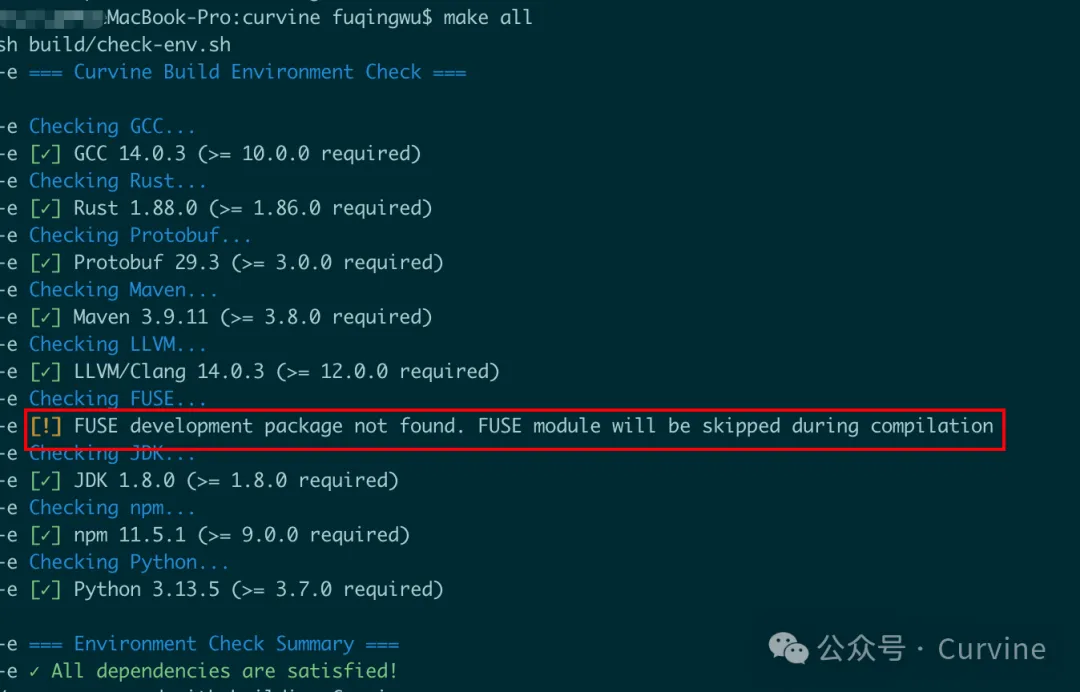
To facilitate compilation, our build script will check dependencies in advance. For macOS users, we will temporarily skip FUSE compilation (currently not adapted for macOS). Interested users can consider using the macfuse project for adaptation.

make-checkenv

4. After Compilation, Start Local Clusterโ€‹

cd build/dist
./bin/restart-all.sh

After successful startup, execute the report command to check if it's working:


bin/cv report

active_master: localhost:8995
journal_nodes: 1,localhost:8996
capacity: 233.5GB
available: 105.0GB (44.99%)
fs_used: 0.0B (0.00%)
non_fs_used: 128.4GB
live_worker_num: 1
lost_worker_num: 0
inode_num: 0
block_num: 0
live_worker_list: 192.168.xxx.xxx:8997,105.0GB/233.5GB (44.99%)
lost_worker_list:

5. View Local Master and Worker WebUIโ€‹

http://localhost:9000/
http://localhost:9001/

webui

6. FIO Testingโ€‹

Test Environment: Alibaba Cloud ecs.r8a.8xlarge instance with one master/worker/client each

  • 32 cores (vCPU)
  • 256 GiB memory
  • System disk and data disk both: ESSD cloud disk 500 GiB (7800 IOPS)
  • Maximum bandwidth: 25Gb

Prepare data (on worker machine):

bin/curvine-bench.sh fuse.write

FIO Sequential Read Test, 8 Concurrent Jobs

fio -iodepth=1 -rw=read -ioengine=libaio -bs=256k
-group_reporting -size=200gb
-filename=/curvine-fuse/fs-bench/0
-name=read_test --readonly -direct=1 --runtime=60
-numjobs=8

FIO Random Read Test, 8 Concurrent Jobs


fio -iodepth=1 -rw=randread -ioengine=libaio -bs=256k
-group_reporting -size=200gb
-filename=/curvine-fuse/fs-bench/0
-name=read_test --readonly -direct=1 --runtime=60
-numjobs=8

Finally, here's a video demonstration of the FIO testing results: