CSI Driver
To facilitate quick integration with Curvine in cloud-native environments, Curvine provides CSI driver support. Your Pod containers can access Curvine through PV (Persistent Volume) without requiring application modifications, enabling the use of Curvine's caching capabilities.
The Curvine CSI driver follows the standard CSI specification and includes:
CSI Controller, deployed inDeploymentmode orStatefulsetmodeCSI Node Plugin, deployed inDaemonSetmode
Deployment scripts are located in the curvine-csi/deploy directory. Execute:
kubectl create -f curvine-csi/deploy
Currently, the curvine-csi depends on a fuse version that only supports cluster configuration file connection method. Therefore, in deploy/configmap.yaml, you need to fill in the master_addrs option with the real curvine master address.
This is a temporary solution. If you want to try it out, you can test it. We are working on supporting custom parameters for fuse, and various configuration parameters for connecting to the cluster will be customized through storageclass or pv attributes. This will be released soon, stay tuned!
The CSI driver is still in rapid iteration. If you encounter issues during use, welcome to submit an issue 😄!
After successful deployment, you will see the following pods:
NAME                     READY   STATUS    RESTARTS   AGE
curvine-controller-0     4/4     Running   0          4h32m
curvine-csi-node-jbvmt   3/3     Running   0          4h32m
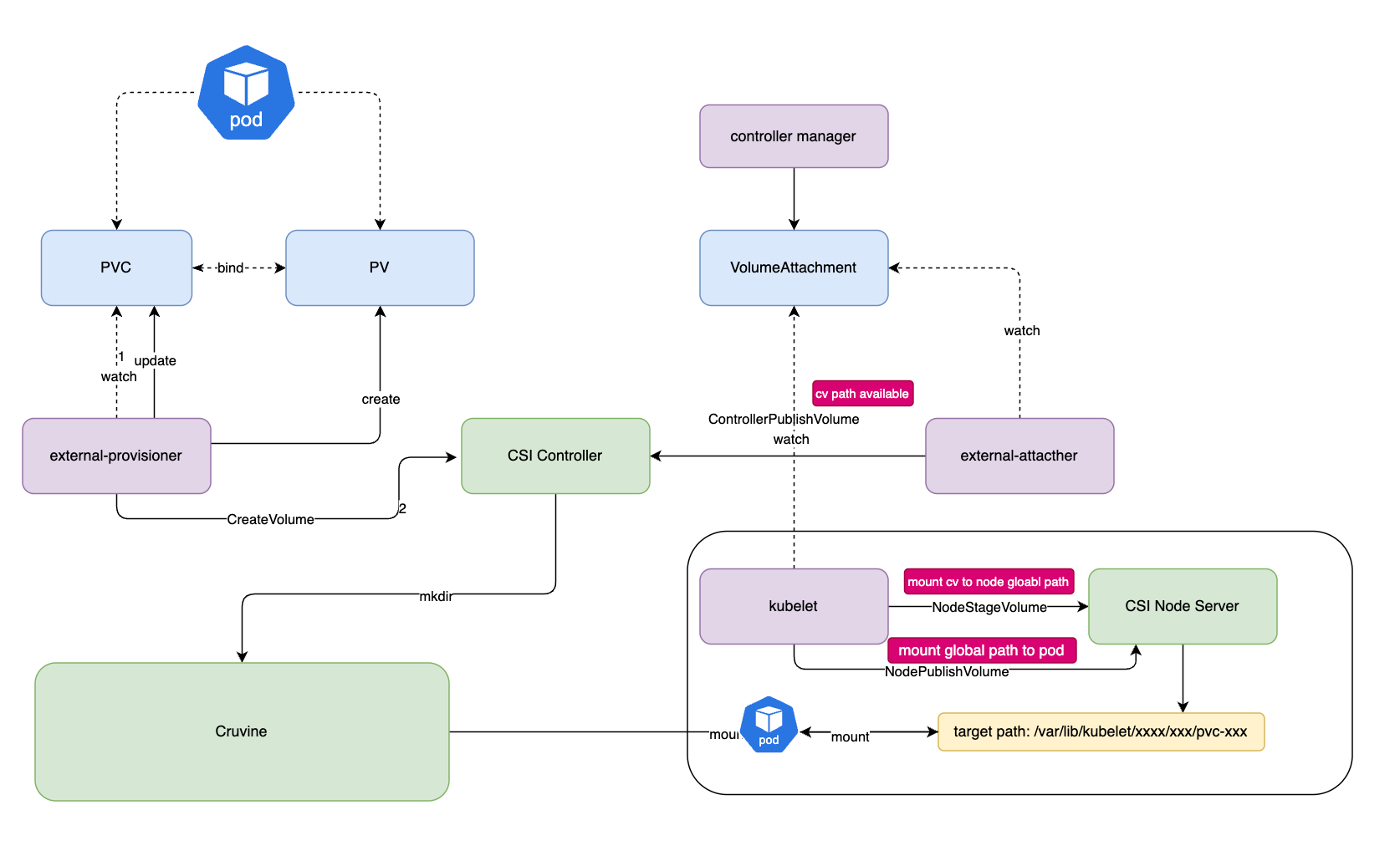
The Curvine CSI driver depends on fuse, which is established by the CSI node plugin. Since CSI driver upgrades will interrupt the fuse service, proceed with caution.
Deploy CSI
First, deploy the CSI driver in the k8s cluster and ensure that the CSI node plugin is running properly.
PVC+Static PV
You can manually create a static PV and bind the PVC to the static PV. Example:
---
apiVersion: v1
kind: PersistentVolume
metadata:
  name: curvine-pv
  labels:
    type: curvine
spec:
  storageClassName: curvine-sc
  capacity:
    storage: 10Gi
  accessModes:
    - ReadWriteOnce
  persistentVolumeReclaimPolicy: Delete
  csi:
    driver: curvine
    volumeHandle: curvine-volume-1
    volumeAttributes:
      curvinePath: "/"
      type: "Directory" # Using Directory type requires that the path must already exist
The following fields are required:
volumeAttributes.curvinePathmust be/, as currently Curvine fuse only supports mounting the root pathvolumeAttributes.typeasDirectoryindicates the path already exists.DirectoryOrCreateindicates the path will be automatically created if it doesn't exist
PVC+Dynamic PV
To use dynamic PV, you need to define a StorageClass first.
StorageClass example:
apiVersion: storage.k8s.io/v1
kind: StorageClass
metadata:
  name: curvine-sc
provisioner: curvine
reclaimPolicy: Delete
volumeBindingMode: Immediate
allowVolumeExpansion: true
parameters:
  curvinePath: "/"
  type: "DirectoryOrCreate" #"DirectoryOrCreate" or "Directory"
PVC example:
---
apiVersion: v1
kind: PersistentVolumeClaim
metadata:
  name: curvine-pvc
spec:
  storageClassName: curvine-sc
  accessModes:
    - ReadWriteOnce
  resources:
    requests:
      storage: 5Gi
After creating the PVC, a PV will be automatically created with the status Bound, as shown below:
$ kubectl get pvc
NAME          STATUS   VOLUME                                     CAPACITY   ACCESS MODES   STORAGECLASS   VOLUMEATTRIBUTESCLASS   AGE
curvine-pvc   Bound    pvc-fce87a49-828f-43d2-8360-7901b0b5f886   5Gi        RWO            curvine-sc     <unset>                 16s
Creating a Pod
Mount the Curvine volume to a pod. Example:
apiVersion: v1
kind: Pod
metadata:
  name: curvine-csi-pod
  labels:
    app: curvine-csi-pod
spec:
  containers:
    - name: web-server
      image: nginx
      ports:
        - containerPort: 80
          name: "http-server"
      volumeMounts:
        - mountPath: "/usr/share/nginx/html"
          name: curvine-storage
  volumes:
    - name: curvine-storage
      persistentVolumeClaim:
        claimName: curvine-pvc
Verification
On a cluster with Curvine running, you can manually create a file in the root path, such as 'index.html'. You can use the fuse feature; by default, the fuse mounted by Curvine is at the /curvine-fuse path.
$ ls /curvine-fuse
index.html
Check in the pod:
$ kubectl exec curvine-test-pod -n default -- /usr/bin/cat /usr/share/nginx/html/index.html
<html>
        hello curvine csi
</html>
Curvine CSI Driver Helm Chart
Using Helm chart to deploy the Curvine CSI (Container Storage Interface) driver on a Kubernetes cluster.
Prerequisites
- Kubernetes 1.19+
- Helm 3.0+
Installation
Add Helm Repository (if available)
helm repo add curvine https://charts.curvine.io
helm repo update
Install from Local Chart
# Install with default values
helm install curvine-csi ./curvine-csi

# Install with custom values
helm install curvine-csi ./curvine-csi -f custom-values.yaml

# Install in specific namespace
helm install curvine-csi ./curvine-csi --namespace curvine-system --create-namespace
Configuration
The following table lists the configurable parameters and their default values:
| Parameter | Description | Default |
|---|---|---|
global.namespace | Namespace to deploy resources | default |
image.repository | Curvine CSI image repository | curvine/curvine-csi |
image.tag | Curvine CSI image tag | latest |
image.pullPolicy | Image pull policy | Always |
csiDriver.name | CSI driver name | curvine |
csiDriver.attachRequired | Whether attach is required | true |
csiDriver.podInfoOnMount | Whether pod info on mount | false |
controller.replicas | Number of controller replicas | 1 |
controller.priorityClassName | Priority class for controller | system-cluster-critical |
node.priorityClassName | Priority class for node | system-node-critical |
rbac.create | Create RBAC resources | true |
configMap.name | ConfigMap name | curvine-config |
Customization
Custom Curvine Configuration
You can customize the Curvine configuration by modifying the configMap.data.curvineClusterToml value:
configMap:
  data:
    curvineClusterToml: |
      [client]
      master_addrs = [
          { hostname = "your-master-host", port = 8995 }
      ]

      [log]
      level = "debug"
      log_dir = "stdout"
      file_name = "curvine.log"
Custom Images
image:
  repository: your-registry/curvine-csi
  tag: v1.0.0
  pullPolicy: IfNotPresent

controller:
  sidecars:
    provisioner:
      image: registry.k8s.io/sig-storage/csi-provisioner:v3.6.0
    attacher:
      image: registry.k8s.io/sig-storage/csi-attacher:v4.5.0
Node Tolerations
node:
  tolerations:
    - key: "node-role.kubernetes.io/master"
      operator: "Exists"
      effect: "NoSchedule"
    - key: "node-role.kubernetes.io/control-plane"
      operator: "Exists"
      effect: "NoSchedule"
Usage
After installation, create a StorageClass:
apiVersion: storage.k8s.io/v1
kind: StorageClass
metadata:
  name: curvine-csi
provisioner: curvine
parameters:
  # Add Curvine-specific parameters
volumeBindingMode: WaitForFirstConsumer
Create a PVC:
apiVersion: v1
kind: PersistentVolumeClaim
metadata:
  name: test-pvc
spec:
  accessModes:
    - ReadWriteOnce
  resources:
    requests:
      storage: 10Gi
  storageClassName: curvine-csi
Uninstallation
helm uninstall curvine-csi
Troubleshooting
Check CSI Driver Status
kubectl get csidriver curvine
kubectl get pods -l app.kubernetes.io/name=curvine-csi
Check Logs
# Controller logs
kubectl logs -l app=curvine-csi-controller -c csi-plugin

# Node logs
kubectl logs -l app=curvine-csi-node -c csi-plugin
Common Issues
- CSI Driver not registered: Check if the node-driver-registrar sidecar is running
- Mount failures: Verify Curvine cluster connectivity and configuration
- Permission issues: Ensure proper RBAC permissions are granted