
S3 Object Storage Gateway (Legacy)
The S3 gateway is not part of the current Curvine server. There is no
curvine-s3-gateway binary or bin/curvine-s3-gateway.sh script in current
releases, and [s3_gateway] configuration is ignored. This page is retained for
older releases only. Use FUSE, the CLI/SDK, or cv mount for current
deployments.
Overview
The Curvine S3 Object Storage Gateway is a high-performance, enterprise-grade S3-compatible gateway that provides standard AWS S3 API access to the Curvine distributed file caching system. Through this gateway, users can access Curvine stored data using any S3 protocol-compatible tools and applications.
Key Features
- Full S3 API Compatibility: Supports all common S3 operations including object and bucket management
- High-Performance Architecture: Built with Rust and Axum for asynchronous high-throughput processing
- Enterprise Security: Supports AWS Signature V2/V4 authentication with comprehensive access control
- Flexible Deployment: Supports standalone deployment
- Streaming Operations: Memory-efficient handling of large files
- Range Requests: Supports HTTP Range requests and partial content downloads
- Multipart Upload: Supports chunked uploads for large files
- Load Balancing: Supports multi-instance deployment for enhanced performance
Architecture Overview
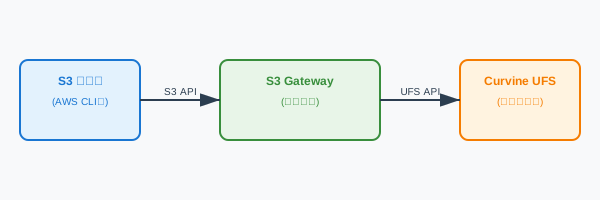
The S3 gateway serves as the frontend interface for the Curvine system, converting standard S3 API requests into Curvine filesystem operations:
Supported S3 Operations
Object Operations
PutObject- Upload objectsGetObject- Download objectsHeadObject- Retrieve object metadataDeleteObject- Delete objectsCopyObject- Copy objects (planned)
Bucket Operations
CreateBucket- Create bucketsDeleteBucket- Delete bucketsHeadBucket- Check bucket existenceListObjects- List objects in bucketGetBucketLocation- Get bucket location
Advanced Features
- Range Requests: Support HTTP Range headers for partial content downloads
- Multipart Upload: Support chunked uploads for large files
- Streaming Transfer: Memory-efficient large file transfers
Service Management
The S3 gateway provides a service management script bin/curvine-s3-gateway.sh in the installation directory (e.g. build/dist or the extracted release package). The examples below assume you are in that directory.
Start Service
# Start with default configuration
bin/curvine-s3-gateway.sh start

# Start with custom configuration file
bin/curvine-s3-gateway.sh start --conf /path/to/curvine-cluster.toml

# Start with custom listen address and region
bin/curvine-s3-gateway.sh start \
    --listen 0.0.0.0:9000 \
    --region us-west-2
Stop Service
# Gracefully stop service
bin/curvine-s3-gateway.sh stop
Check Service Status
# Check service running status
bin/curvine-s3-gateway.sh status
Restart Service
# Restart service
bin/curvine-s3-gateway.sh restart
View Logs
# View real-time logs
tail -f ${CURVINE_HOME}/logs/curvine-s3-gateway.out

# View recent logs
tail -100 ${CURVINE_HOME}/logs/curvine-s3-gateway.out
Startup Parameters
Command Line Arguments
| Parameter | Description | Default | Example |
|---|---|---|---|
--conf | Configuration file path | ${CURVINE_HOME}/conf/curvine-cluster.toml | --conf /etc/curvine.toml |
--listen | Listen address and port | 0.0.0.0:9900 | --listen 127.0.0.1:9000 |
--region | S3 region identifier | us-east-1 | --region us-west-2 |
Configuration File Parameters
The [s3_gateway] section in curvine-cluster.toml supports the following configuration parameters:
| Parameter | Type | Default | Description |
|---|---|---|---|
listen | string | "0.0.0.0:9900" | S3 gateway listen address and port |
region | string | "us-east-1" | S3 region identifier |
put_temp_dir | string | "/tmp/curvine-temp" | Temporary directory for all PUT operations (multipart and regular) |
put_memory_buffer_threshold | integer | 1048576 | Memory buffer threshold for small files (bytes, default: 1MB) |
put_max_memory_buffer | integer | 16777216 | Maximum memory buffer size (bytes, default: 16MB) |
get_chunk_size_mb | float | 1.0 | GET read/write chunk size in MB (default: 1.0, options: 0.5/1/2) |
enable_distributed_auth | boolean | false | Enable distributed authentication |
credentials_path | string | See description | Credentials file path, depends on authentication mode |
cache_refresh_interval_secs | integer | 30 | Cache refresh interval in seconds |
Credentials Path Description:
The credentials_path parameter value depends on the enable_distributed_auth setting:
-
Local Authentication Mode (
enable_distributed_auth = false):- Default path:
~/.curvine/credentials.jsonl - Credentials stored in local filesystem
- Default path:
-
Distributed Authentication Mode (
enable_distributed_auth = true):- Default path:
/system/auth/credentials.jsonl - Credentials stored in Curvine distributed filesystem
- Default path:
Configuration Example:
[s3_gateway]
# Listen address for S3 gateway (host:port)
listen = "0.0.0.0:9900"

# S3 region
region = "us-east-1"

# Temporary directory for all PUT operations (multipart and regular)
put_temp_dir = "/tmp/curvine-temp"

# Memory buffer threshold for small files (bytes, default: 1MB)
put_memory_buffer_threshold = 1048576

# Maximum memory buffer size (bytes, default: 16MB)
put_max_memory_buffer = 16777216

# GET Performance Optimization Settings
# GET read/write chunk size in MB (default: 1.0, options: 0.5/1/2)
get_chunk_size_mb = 1.0

# Authentication mode configuration
# Local authentication mode (default)
enable_distributed_auth = false
credentials_path = "~/.curvine/credentials.jsonl"

# Distributed authentication mode (optional)
# enable_distributed_auth = true
# credentials_path = "/system/auth/credentials.jsonl"

# Cache refresh interval in seconds
cache_refresh_interval_secs = 30
Environment Variables
| Variable | Description | Notes |
|---|---|---|
AWS_ACCESS_KEY_ID or S3_ACCESS_KEY | S3 access key | Read from environment variables at startup, no default value |
AWS_SECRET_ACCESS_KEY or S3_SECRET_KEY | S3 secret key | Read from environment variables at startup, no default value |
RUST_LOG | Log level | Default info, can be set to debug, trace, etc. |
Credential Environment Variables:
The gateway automatically reads the following environment variables as default credentials at startup:
# Set access key (choose either one)
export AWS_ACCESS_KEY_ID="your-access-key"
# or
export S3_ACCESS_KEY="your-access-key"

# Set secret key (choose either one)
export AWS_SECRET_ACCESS_KEY="your-secret-key"
# or
export S3_SECRET_KEY="your-secret-key"
If these environment variables are set, the gateway will automatically add these credentials to the credential store at startup, without manual configuration.
Credential Management
The S3 gateway provides comprehensive credential management functionality, supporting adding, generating, listing, and managing access credentials.
Add Credentials
# Add new access credentials
bin/curvine-s3-gateway.sh credential add \
    --access-key AKIAEXAMPLEKEY123 \
    --secret-key wJalrXUtnFEMI/K7MDENG/bPxRfiCYEXAMPLEKEY \
    --description "Production access key"
Generate Random Credentials
# Generate new random credentials
bin/curvine-s3-gateway.sh credential generate \
    --description "Auto-generated test key"
List Credentials
# List all credentials (secrets hidden)
bin/curvine-s3-gateway.sh credential list

# Show complete credential information (including secrets)
bin/curvine-s3-gateway.sh credential list --show-secrets
View Cache Statistics
# View credential cache statistics
bin/curvine-s3-gateway.sh credential stats
Credential Storage
Credentials are stored in JSONL format:
- Local mode:
~/.curvine/credentials.jsonl - Distributed mode:
/system/auth/credentials.jsonl
Each credential entry contains:
{
  "access_key": "AKIAEXAMPLEKEY123",
  "secret_key": "wJalrXUtnFEMI/K7MDENG/bPxRfiCYEXAMPLEKEY",
  "created_at": 1640995200,
  "enabled": true,
  "description": "Production access key"
}
Usage Examples
AWS CLI
# Configure environment variables
export AWS_ACCESS_KEY_ID=AqU4axe4feDyIielarPI
export AWS_SECRET_ACCESS_KEY=0CJZ2QfHi2tDb4DKuCJ2vnBEUXg5EYQt
export AWS_DEFAULT_REGION=us-east-1

# Create bucket
aws s3 mb s3://my-bucket --endpoint-url http://localhost:9900

# Upload file
aws s3 cp /path/to/local/file.txt s3://my-bucket/ --endpoint-url http://localhost:9900

# Download file
aws s3 cp s3://my-bucket/file.txt /tmp/ --endpoint-url http://localhost:9900

# List objects
aws s3 ls s3://my-bucket/ --endpoint-url http://localhost:9900

# Delete object
aws s3 rm s3://my-bucket/file.txt --endpoint-url http://localhost:9900

# Sync directory
aws s3 sync /local/directory s3://my-bucket/prefix/ --endpoint-url http://localhost:9900
MinIO Client (mc)
# Configure MinIO client
mc alias set curvine http://localhost:9900 AqU4axe4feDyIielarPI 0CJZ2QfHi2tDb4DKuCJ2vnBEUXg5EYQt

# Create bucket
mc mb curvine/my-bucket

# Upload file
mc cp /path/to/file.txt curvine/my-bucket/

# Download file
mc cp curvine/my-bucket/file.txt /tmp/

# List contents
mc ls curvine/my-bucket/

# Mirror directory
mc mirror /local/directory curvine/my-bucket/prefix/
Python boto3
import boto3
from botocore.config import Config

# Create S3 client
s3_client = boto3.client(
    's3',
    endpoint_url='http://localhost:9900',
    aws_access_key_id='AqU4axe4feDyIielarPI',
    aws_secret_access_key='0CJZ2QfHi2tDb4DKuCJ2vnBEUXg5EYQt',
    region_name='us-east-1',
    config=Config(retries={'max_attempts': 3})
)

# Create bucket
s3_client.create_bucket(Bucket='my-python-bucket')

# Upload file
with open('local-file.txt', 'rb') as f:
    s3_client.put_object(Bucket='my-python-bucket', Key='remote-file.txt', Body=f)

# Download file
response = s3_client.get_object(Bucket='my-python-bucket', Key='remote-file.txt')
data = response['Body'].read()

# List objects
response = s3_client.list_objects_v2(Bucket='my-python-bucket')
for obj in response.get('Contents', []):
    print(f"Object: {obj['Key']}, Size: {obj['Size']}")
Range Request Examples
# Get first 1000 bytes of a file
curl -H "Range: bytes=0-999" \
     -H "Authorization: AWS4-HMAC-SHA256 ..." \
     http://localhost:9900/my-bucket/large-file.txt

# Get last 1000 bytes of a file
curl -H "Range: bytes=-1000" \
     -H "Authorization: AWS4-HMAC-SHA256 ..." \
     http://localhost:9900/my-bucket/large-file.txt
Multi-Instance Deployment
To improve performance and availability, you can deploy multiple S3 gateway instances.
Note: Currently, the S3 gateway uses a centralized deployment model. The decentralized gateway capability that starts with Worker nodes is under development and will support a more distributed deployment architecture in the future.
Load Balancer Configuration
Using Nginx
upstream s3_gateway {
    server 192.168.1.10:9900 weight=1;
    server 192.168.1.11:9900 weight=1;
    server 192.168.1.12:9900 weight=1;
}

server {
    listen 80;
    server_name s3-gateway.example.com;

    location / {
        proxy_pass http://s3_gateway;
        proxy_set_header Host $host;
        proxy_set_header X-Real-IP $remote_addr;
        proxy_set_header X-Forwarded-For $proxy_add_x_forwarded_for;

        # S3-specific configuration
        proxy_buffering off;
        proxy_request_buffering off;
        client_max_body_size 0;
    }
}
Using HAProxy
backend s3_gateway
    balance roundrobin
    option httpchk GET /healthz
    server gateway1 192.168.1.10:9900 check
    server gateway2 192.168.1.11:9900 check
    server gateway3 192.168.1.12:9900 check

frontend s3_frontend
    bind *:80
    default_backend s3_gateway
Multi-Instance Startup
Start gateway instances on each node:
# Node 1
bin/curvine-s3-gateway.sh start \
    --conf /etc/curvine-cluster.toml \
    --listen 0.0.0.0:9900

# Node 2
bin/curvine-s3-gateway.sh start \
    --conf /etc/curvine-cluster.toml \
    --listen 0.0.0.0:9900

# Node 3
bin/curvine-s3-gateway.sh start \
    --conf /etc/curvine-cluster.toml \
    --listen 0.0.0.0:9900
High Availability Configuration
Configure Shared Storage
Ensure all gateway instances use the same Curvine cluster configuration:
[s3_gateway]
# Use distributed authentication for credential consistency
enable_distributed_auth = true
credentials_path = "/system/auth/credentials.jsonl"

# Shared temporary directory for PUT operations (multipart and regular)
put_temp_dir = "/shared/curvine-temp"
Health Checks
Each gateway instance provides a health check endpoint:
# Check gateway health
curl http://localhost:9900/healthz
Performance Optimization
System-Level Optimization
# Increase file descriptor limits
ulimit -n 65536

# Optimize network parameters
echo 'net.ipv4.tcp_keepalive_time = 600' >> /etc/sysctl.conf
echo 'net.core.rmem_max = 16777216' >> /etc/sysctl.conf
echo 'net.core.wmem_max = 16777216' >> /etc/sysctl.conf
sysctl -p
Configuration Tuning
[s3_gateway]
# Optimize cache refresh interval
cache_refresh_interval_secs = 60
Troubleshooting
Common Issues
-
Port Already in Use
# Change listen port bin/curvine-s3-gateway.sh start --listen 0.0.0.0:9901 -
Authentication Failures
# Check environment variables echo $AWS_ACCESS_KEY_ID echo $AWS_SECRET_ACCESS_KEY # Check if credentials exist in credential store bin/curvine-s3-gateway.sh credential list # View credential store path and statistics bin/curvine-s3-gateway.sh credential stats # View authentication logs export RUST_LOG=curvine_s3_gateway::auth=debug -
Configuration File Errors
# Validate configuration file
bin/curvine-s3-gateway.sh start --conf /path/to/config.toml

# Use default configuration
bin/curvine-s3-gateway.sh start
Debug Mode
# Enable verbose logging
export RUST_LOG=debug
bin/curvine-s3-gateway.sh start

# Enable trace level logging
export RUST_LOG=trace
bin/curvine-s3-gateway.sh start
With these configurations and optimizations, you can build an efficient S3 gateway to access data cached in Curvine.